# supportdatabases.com @ Data API
# Admin panel
### How to get to the admin panel page?
Go to [https://data.supportdatabases.com/dashboard](https://data.supportdatabases.com/dashboard "Dashboard page") and log in.
Admin user
Login: `masterbase@local.loc`
Password: `hy6$@&drahe^&$38ad`
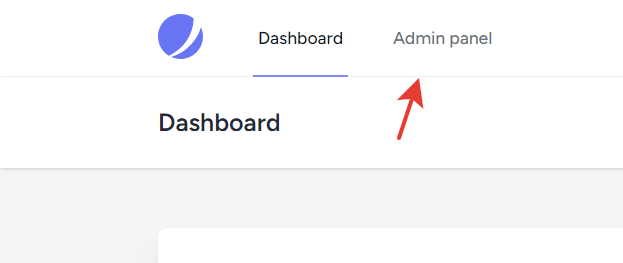
After you have logged in, click on the link. If you don't see the link, you need to add permissions to visit the admin page.
[](https://wikis.supportdatabases.com/uploads/images/gallery/2023-07/image.png)
### How to upload a new file?
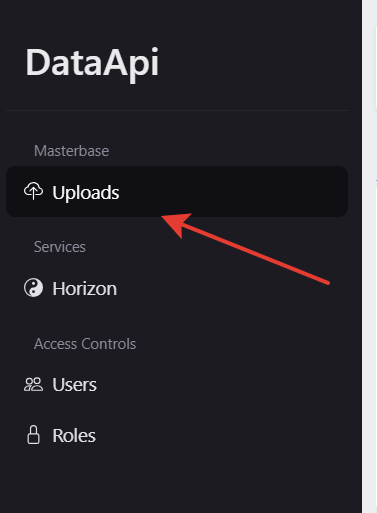
Go to the admin panel and open the uploads page.
[](https://wikis.supportdatabases.com/uploads/images/gallery/2023-07/MiFimage.png)
#### Manual upload
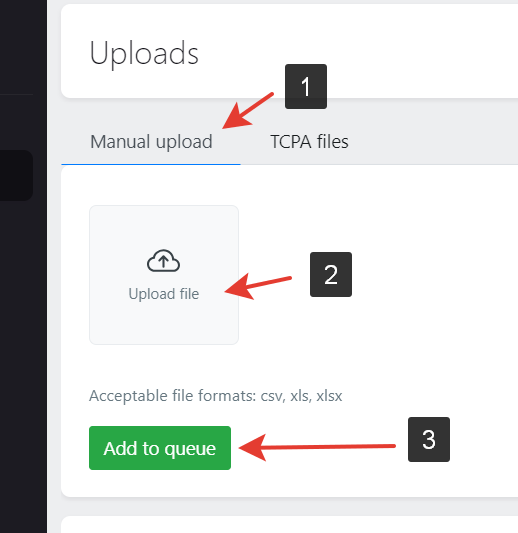
Do next steps:
1\. Switch to the "Manual upload" tab;
2\. Upload files you want to;
3\. Click the "Add to queue" button.
[](https://wikis.supportdatabases.com/uploads/images/gallery/2023-07/ybtimage.png)
#### Upload a file from the tcpa server
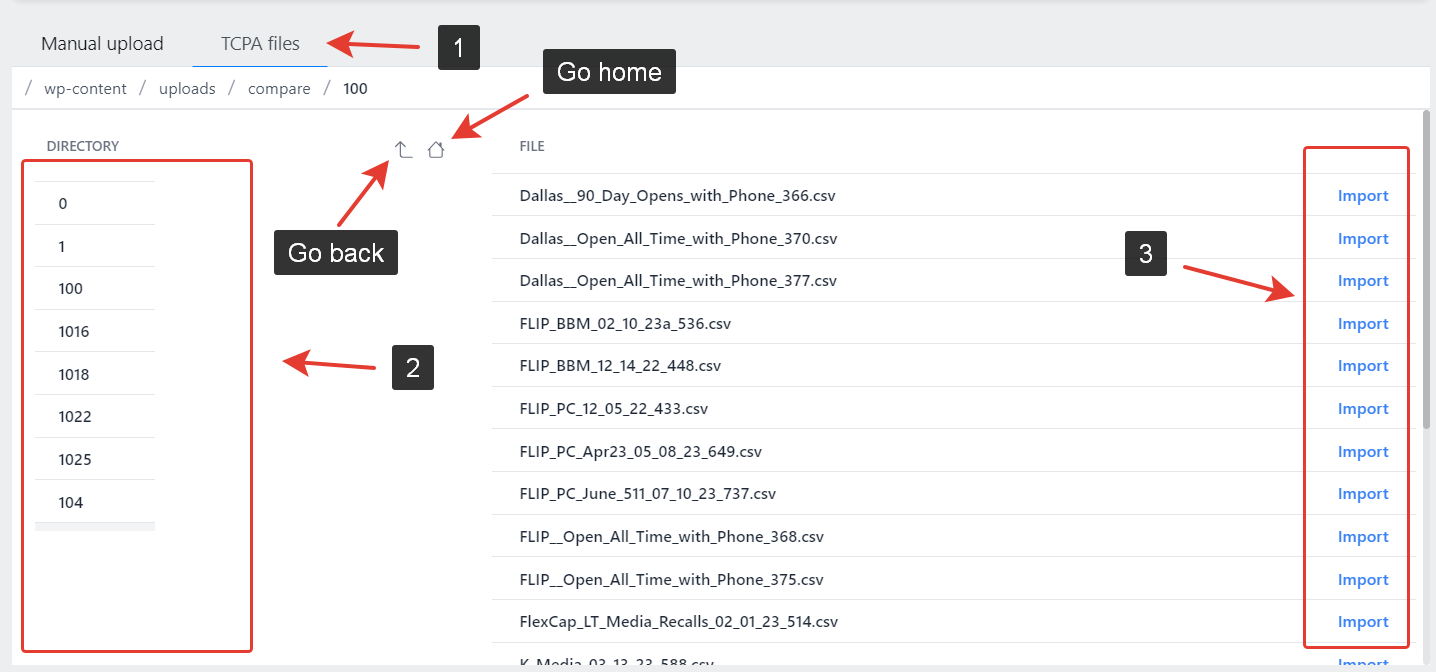
Do next steps:
1\. Switch to the "TCPA files" tab;
2\. Click on directories to open them;
3\. On the right side you will see files from the selected directory.
4\. Click an "Import" button to download file and add it to the queue.
[](https://wikis.supportdatabases.com/uploads/images/gallery/2023-07/QYYimage.png)
# Worklog
##### 8/5/2023
1. Added a job that removes source data. Added tests.
2. Added a job that saves source files to cloud storage (s3). Added tests.
3. Added an endpoint that allows uploading files. Added tests.
4. Installed and configured the S3 storage driver;
##### 8/6/2023
1. Changed API response format. Update tests;
##### 8/13/2023
1. Added api.upload\_file permission. Added tests.
2\. Added a formatted response for the 403 error;
##### 8/26/2023
1. Added API docs;
##### 9/5/2023
1. Added "from" and "to" fields into the Revenue type field. Added tests;
##### 9/7/2023
1. Added the EmployeeCount data type.
2\. Added EmployeeCount's aliases.
3\. Added a job that generates an employs count range based on an employ count column.
4\. Added tests;
##### 9/15/2023
Problem intro: There's a big tabled named record\_other\_data that stores compiled information in json format. I was going to update some fields in that json data, but in postgres, when you update or delete rows in a table, they won't actually be removed, they just will be flagged as removed. So, the table size i getting bigger. To free disk space, we need to run a command VACUUM FULL. That command makes a copy of a table and removes the original one along with releasing the occupied disk space. The problem is that the server doesn't have enough space to make a copy of the table and so it can't remove old data and because of it the table only is getting bigger and bigger.
1\. Configured partitioning on the record\_other\_data table and optimized.
2\. Installed citus extension for postgresql. Researched data compression. The extension can compress data with 6x rate, but there is a problem with performance. Tested only with a partitioned table. (Disabled)
3\. Updated EmployeeCount fields.
4\. Freed disk space.